 CueCatch
Page
Reference for the Page data model in surveys.
Pages are the backbone of your CueCatch surveys. They contain your survey questions, guide user progress, and offer versatile customization options. Let's explore their structure and features.
Page Structure
A page can include the following optional elements:
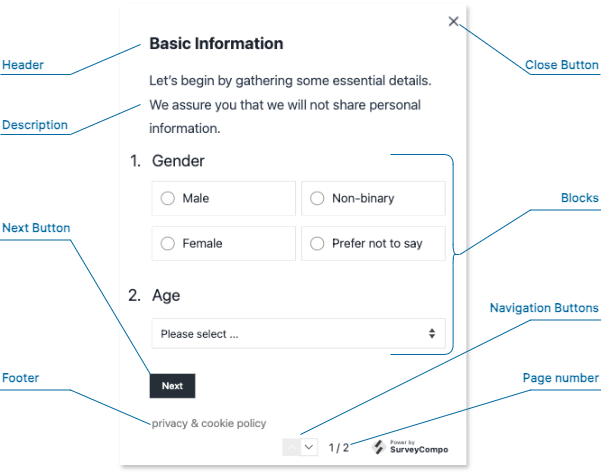
- Header: A dedicated area at the top for titles or instructions.
- Description: Provides more context about the page's purpose or offers additional instructions for the user.
- Blocks: The fundamental building blocks of your survey questions. A page can contain multiple blocks, each typically representing one question. (See the 'Blocks' section for a detailed breakdown.)
- Footer: Use this for additional information, navigation, or legal statements.
- Next Button: Allows users to progress to the following page. Clicking "Next" also triggers validation of the inputs on the current page.
Page Layout
To customize the arrangement of your page elements, CueCatch offers the following settings:
vCentered: Vertically center elements. The default istrue.hCentered: Horizontally center elements. The default isfalse.
Customization with HTML
Enhance headers, descriptions, and footers with custom HTML syntax for:
- Rich Formatting: Control fonts, colors, text size, emphasis (bold, italics), and more.
- Embed Media: Integrate images, videos, or audio clips to enhance your questions.
- Interactive Elements: Add buttons, links, or other interactive components directly within a page.
CueCatch uses specific 'html' keys for custom content:
htmlHeaderhtmlDescriptionhtmlFooter
Refer to the Custom HTML documentation for more information.
Warning
Use valid HTML syntax and prioritize security. Avoid incorporating code from unknown sources or user input, as it could introduce vulnerabilities.Branching/Skipping Logic
Use the visibleIf setting to conditionally show or hide pages based on survey responses. This is key for creating adaptive surveys that tailor the experience to the user's input. For detailed information on conditional logic, refer to the Conditional Logic documentation.
Page Randomization
Prevent response bias by shuffling the order of pages. CueCatch's randomizedWithinGroup setting allows for randomization of all or selected pages. When multiple pages share the same group name, they are randomized together. For detailed information on randomization, refer to the Randomization documentation.
Page JSON Example
The following code example demonstrates how a page integrates into the survey JSON data model. view source
{
  "name": "My Survey",
  "startScreens": [
    /* ... */
  ],
  "pages": [
    {
      "header": "Basic Information",
      "htmlDescription": "<p>Let’s begin by gathering some essential details. <br />We assure you that we will not share personal information.</p>",
      "htmlFooter": "<p class='footnote'><a href=''>privacy</a> & <a href=''>cookie policy<a></p>",
      "blocks": [
        /* ... */
      ],
      "nextButtonLabel": "Next"
    }
    /* ... */
  ],
  "completeScreens": [
    /* ... */
  ],
  "abortScreens": [
    /* ... */
  ]
}
Page Data Keys
| Method | Type | Default | Description |
|---|---|---|---|
name | string | null | The name of the page. |
customRef | string | null | A custom reference ID for the page. |
templateName | string | null | The page template name. The current page inherits keys from the matched template. |
header | string | null | The page header text. |
htmlHeader | string | null | The page header in HTML format. |
description | string | null | A text description for the page. |
htmlDescription | string | null | The page description in HTML format. |
footer | string | null | The page footer text. |
htmlFooter | string | null | The page footer in HTML format. |
blocks | [Block[]](/docs/data-models/block#block-data-keys) | [] | An array of blocks on the page. |
nextButtonLabel | string | 'OK' | The label on the page's next button. |
nextButtonURL | string | null | The URL to redirect to when the next button is clicked. |
nextButtonHidden | boolean | false | If true, the next button is hidden. |
autoAdvancePage | boolean | false | If true, the page automatically advances to the next when applicable. |
hCentered | boolean | false | If true, the page content is centered horizontally. |
vCentered | boolean | true | If true, the page content is centered vertically. |
visibleIf | Condition Expression | false | The condition for page visibility. The page is displayed only if the condition is met. |
requiresVisibleBlocks | boolean | false | If true, the page is displayed only if there are visible blocks on the page. |
randomWithinGroup | string | false | If set, the display order of pages with the same group name is randomized. |