 CueCatch
Survey
Reference for the Survey data model — the top-level JSON structure.
CueCatch offers a powerful and versatile way to design surveys using a flexible data model written in JSON. This section introduces you to the key building blocks of a CueCatch survey.
Survey Structure
Imagine your CueCatch survey as a journey. Here's a visual breakdown of the key elements:
- Start Screen (Optional)
- Welcomes users, sets the stage, and provides initial instructions.
- Survey Pages
- The heart of your survey, where questions are asked and data is collected. Each page is made up of one or more "Blocks". CueCatch gives you the freedom to design your surveys in either of these styles:
- Single Page: All questions are displayed on one page.
- Multi-Page: Questions are divided into multiple pages, guiding users through the survey.
- Blocks
- The fundamental units that hold your questions. They contain input controls where users provide their responses. CueCatch offers a variety of input controls, from text boxes to specialized elements like Likert scales.
- End Screen (Optional)
- Signal the end of the survey.
CueCatch offers two customizable end screens to manage your survey flow.
- Completion Screen: Thanks respondents and may provide further instructions.
- Abort Screen: Informs users if they don't meet survey criteria.
The User Flow
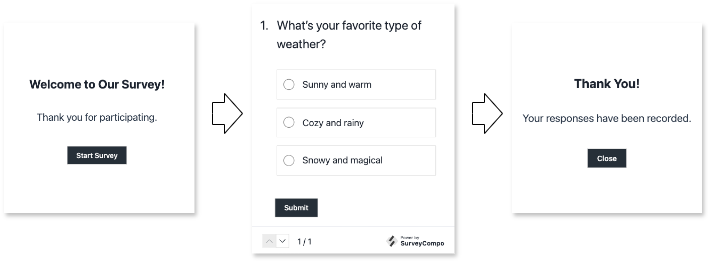
Imagine a user journey through the survey:
- Invitation: The optional Start Screen introduces the survey.
- Questions and Answers: Users navigate through Survey Pages, providing responses in Blocks.
- Outcome:
- Success: Upon completion, they see the Completion Screen.
- Disqualification: If ineligible, they are directed to the Abort Screen.
JSON Schema
A JSON Schema is available for the survey data model. You can reference it in your survey JSON using the $schema key for editor autocompletion and validation:
{
  "$schema": "https://www.cuecatch.com/schemas/survey.schema.json",
  "name": "My Survey"
}
Survey JSON Example
CueCatch uses JSON (JavaScript Object Notation) to define your survey's structure. Think of JSON as a blueprint, using key-value pairs to describe each survey element and its properties. Here's a simplified example:
{
  "$schema": "https://www.cuecatch.com/schemas/survey.schema.json",
  "name": "My Survey",
  "startScreens": [
    /* ... */
  ],
  "pages": [
    {
      "blocks": [
        {
          "inputs": [
            /* ... */
          ]
        }
      ]
      /* ... */
    }
    /* ... */
  ],
  "completeScreens": [
    /* ... */
  ],
  "abortScreens": [
    /* ... */
  ]
}
Survey Data Keys
| Method | Type | Default | Description |
|---|---|---|---|
name | string | n/a (Required) | The name of the survey. |
description | string | null | Option description of the survey. |
customRef | string | null | A custom reference ID for the survey. |
variables | object | {} | A map of external key-value pairs, such as user name, product name, etc. Variables can be used with piping and conditional logic |
inputValues | object | {} | A map of key-value pairs to pre-fill input fields. The key is the input ID (optionally prefixed with '#') and the value is the pre-filled value. |
pageTemplates | [Page[]](/docs/data-models/page#page-data-keys) | [] | An array of Page templates, used to share common key values across multiple pages. |
blockTemplates | [Block[]](/docs/data-models/block#block-data-keys) | [] | An array of Block templates, used to share common key values across multiple blocks. |
pages | [Page[]](/docs/data-models/page#page-data-keys) | [] | Array of survey pages. |
startScreens | [Screen[]](/docs/data-models/screen#screen-data-keys) | [] | An array of Screen models, one of which will be displayed at the start of the survey. |
abortScreens | [Screen[]](/docs/data-models/screen#screen-data-keys) | [] | An array of Screen models, one of which will be displayed when the participant is disqualified from the survey. |
completeScreens | [Screen[]](/docs/data-models/screen#screen-data-keys) | [] | An array of Screen models, one of which will be displayed upon the survey's completion. |
theme | Theme | null | The Theme model for customizing the survey's appearance. |
css | string | null | Global custom CSS applicable to custom HTML elements. |
uiShowNavigation | boolean | true | Determines if the navigation buttons should be displayed. |
uiShowProgress | boolean | true | Determines if the page progress indicator should be displayed. |
uiShowCloseButton | boolean | false | Determines if a close button should be displayed at the top-right corner. |
uiUseAnimation | boolean | true | Determines if a sliding animation should be used for page navigation. |
uiUseFullWidthButtons | boolean | undefined | Determines if the page and screen display buttons that span the full width. By default, buttons are set to occupy the full width only on smaller screens. |
timeoutSeconds | number | 1800 | The duration of inactivity, in seconds, before the survey session times out and resets. |
dataEndpoint | string | undefined | URL of the data endpoint for survey event data. If undefined, events are sent to CueCatch. You can specify your own data endpoint for data collection. (Available to Premium Plan only) |
Info
Why Arrays for Screens? CueCatch supports multiple start, completion, and abort screens. By using conditional logic, these multiple screens enable you to customize the survey experience based on user responses and/or external variables.