 CueCatch
Vue.js
Integrate CueCatch surveys in Vue.js applications.
Integrating CueCatch survey component in a Vue.js project involves a few steps:
- Add the CueCatch component JavaScript to the HTML template.
- Skipping component resolution for custom elements.
- Use the survey component in your Vue component as you would with any other HTML element.
Adding CueCatch Component JavaScript
Include the script tag in the HTML page (typically index.html) header.
<!DOCTYPE html>
<html lang="">

<head>
  <meta charset="utf-8">
  <meta http-equiv="X-UA-Compatible" content="IE=edge">
  <meta name="viewport" content="width=device-width,initial-scale=1.0">
  <link rel="icon" href="<%= BASE_URL %>favicon.ico">
  <script type="module" src="https://cdn.jsdelivr.net/npm/cuecatch@latest/v1.main.js"></script>
  <title>
    <%= htmlWebpackPlugin.options.title %>
  </title>
</head>

<body>
  <div id="app"></div>
  <!-- built files will be auto injected -->
</body>

</html>
Skipping Component Resolution
By default, Vue will attempt to resolve a non-native HTML tag as a registered Vue component before falling back to rendering it as a custom element. This will cause Vue to emit a "failed to resolve component" warning during development. To let Vue know that certain elements should be treated as custom elements and skip component resolution, we can specify the compilerOptions.isCustomElement option.
const { defineConfig } = require('@vue/cli-service')
module.exports = defineConfig({
  transpileDependencies: true,
  chainWebpack: config => {
    config.module
      .rule('vue')
      .use('vue-loader')
      .tap(options => ({
        ...options,
        compilerOptions: {
          // treat cue-catch tag as custom element
          isCustomElement: tag => tag === 'cue-catch'
        }
      }))
 }})
Depends how your Vue project is set up, you may need to set the isCustomElement option in a different way. For more details, refer to the Vue documentation.
Using the Survey Component
You can now use cue-catch element anywhere in your component templates.
// SurveyExample.vue
<template>
<div class="main">
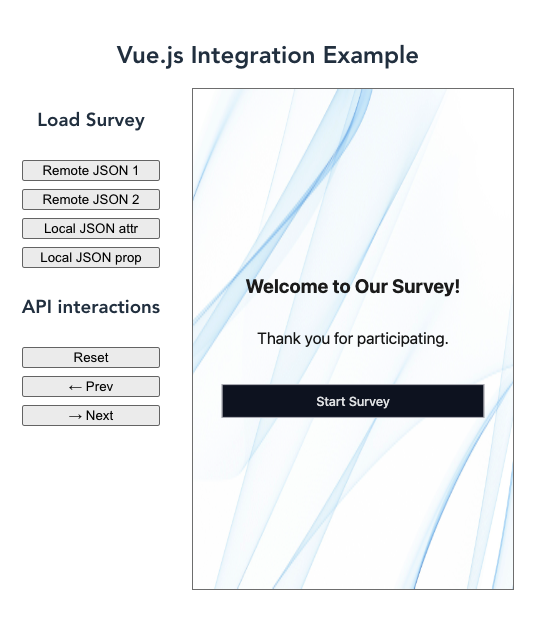
<h1 class="title">Vue.js Integration Example</h1>
<div class="layout">
<div class="button-group">
<h3>Load Survey</h3>
<button @click="setSurvey('survey1')">Remote JSON 1</button>
<button @click="setSurvey('survey2')">Remote JSON 2</button>
<button @click="setLocalSurveyByAttr()" >Local JSON attr</button>
<button @click="setLocalSurveyByProp()" >Local JSON prop</button>
<h3>API interactions</h3>
<button @click="reset()">Reset</button>
<button @click="goPrev()"> ← Prev</button>
<button @click="goNext()"> → Next</button>
</div>
<div class="survey-container">
<cue-catch ref="cuecatch" cache="memory" :src="surveySource" />
</div>
</div>
</div>
</template>
<script>
import {exampleJSON} from './example'
const surveys = {
survey1: 'https://raw.githubusercontent.com/cuecatch/examples/main/examples/inputs/source.json',
survey2: 'https://raw.githubusercontent.com/cuecatch/examples/main/examples/style/source.json',
local: JSON.stringify(exampleJSON),
};
export default {
name: 'SurveyExample',
data() {
return {
surveySource: 'https://raw.githubusercontent.com/cuecatch/examples/main/examples/basic/source.json',
memory: true
}
},
methods: {
setSurvey(surveyName) {
this.surveySource = surveys[surveyName];
},
setLocalSurveyByAttr() {
this.surveySource = JSON.stringify(exampleJSON);
},
setLocalSurveyByProp() {
this.$refs.cuecatch.src = exampleJSON;
},
reset() {
this.$refs.cuecatch.api.reset();
},
goNext() {
this.$refs.cuecatch.api.goNext();
},
goPrev() {
this.$refs.cuecatch.api.goPrev();
},
}
}
</script>
<!-- Add "scoped" attribute to limit CSS to this component only -->
<style scoped>
.main {
max-width: 1280px;
margin: 0 auto;
padding: 2rem;
text-align: center;
}
.layout {
display: flex;
flex-direction: row;
margin: 0 auto;
gap: 2rem;
width: fit-content;
}
.title {
font-size: 1.5rem;
margin-bottom: 1rem;
}
.button-group {
display: flex;
gap: 0.5rem;
flex-direction: column;
}
.survey-container {
border: 1px solid gray;
width: 320px;
height: 500px;
margin-bottom: 1rem;
}
</style>
Example
You can refer to the following example repository for a working example of CueCatch Vue.js integration. This example demonstrates how to load a survey from remote and local JSON files and interact with the survey component using the API. View source on GitHub