 CueCatch
React.js
Integrate CueCatch surveys in React applications.
Integrating CueCatch survey component in a React.js project involves a few steps:
- Add the CueCatch component JavaScript to the HTML page template.
- If your project uses TypeScript, declare the CueCatch component type.
- Use the survey component in your React component as you would with any other HTML element.
Adding CueCatch Component JavaScript
Include the script tag in the HTML page (typically index.html) header.
html
<!DOCTYPE html>
<html lang="en">
  <head>
    <meta charset="UTF-8" />
    <link rel="icon" type="image/png" href="/logo.png" />
    <meta name="viewport" content="width=device-width, initial-scale=1.0" />
    <title>CueCatch React.js Integration Example</title>
    <script type="module" src="https://cdn.jsdelivr.net/npm/cuecatch@latest/v1.main.js"></script>
  </head>
  <body>
    <div id="root"></div>
    <script type="module" src="/src/main.tsx"></script>
  </body>
</html>
Declaring the CueCatch Component Type
For TypeScript projects, add component type declarations. Create a types.d.ts file in the project root directory and declare the CueCatch component type.
typescript
// types.d.ts
import * as React from "react"

interface CueCatchAttributes
  extends React.DetailedHTMLProps<
    React.HTMLAttributes<HTMLElement>,
    HTMLElement
  > {
  src?: string | unknown
  class?: string
  ref?: unknown
  onchange?: unknown
  onload?: unknown
  cache?: "memory" | "localstorage"
}

declare global {
  namespace JSX {
    interface IntrinsicElements {
      "cue-catch": CueCatchAttributes
    }
  }
}
Using the Survey Component
To use the CueCatch component in a React component, create a new component and use the cue-catch element.
typescript
import { useEffect, useRef, useState } from "react"
import "./App.css"
import localExample from "./example.json"
function App() {
const surveys: Record<string, unknown> = {
survey1:
"https://raw.githubusercontent.com/cuecatch/examples/main/examples/inputs/source.json",
survey2:
"https://raw.githubusercontent.com/cuecatch/examples/main/examples/style/source.json",
local: JSON.stringify(localExample)
}
const [sourceName, setSourceName] = useState("survey1")
const surveySource = surveys[sourceName]
const surveyElement = useRef<{
src: unknown
api: { reset: () => void; goNext: () => void; goPrev: () => void }
}>()
const onSurveyChange = (event: Event) => {
const customEventDetail = (event as CustomEvent).detail
console.log(customEventDetail)
}
const resetSurvey = () => {
surveyElement.current?.api.reset()
}
const goNext = () => {
surveyElement.current?.api.goNext()
}
const goPrev = () => {
surveyElement.current?.api.goPrev()
}
const setDataToInstance = () => {
if (surveyElement.current) {
surveyElement.current.src = localExample
}
}
useEffect(() => {
window.addEventListener("cuechange", onSurveyChange)
return () => {
window.removeEventListener("cuechange", onSurveyChange)
}
}, [sourceName, onSurveyChange])
return (
<>
<h1 className="title">React.js Integration Example</h1>
<div className="layout">
<div className="button-group">
<h3>Load Survey</h3>
<button onClick={() => setSourceName("survey1")}>
Remote JSON 1
</button>
<button onClick={() => setSourceName("survey2")}>
Remote JSON 2
</button>
<button onClick={() => setSourceName("local")}>
Local JSON attr
</button>
<button onClick={() => setDataToInstance()}>Local JSON prop</button>
<h3>API interactions</h3>
<button onClick={() => resetSurvey()}>Reset</button>
<button onClick={() => goPrev()}> ← Prev</button>
<button onClick={() => goNext()}> → Next</button>
</div>
<div className="survey-container">
<cue-catch ref={surveyElement} cache="memory" src={surveySource} />
</div>
</div>
</>
)
}
export default AppExample
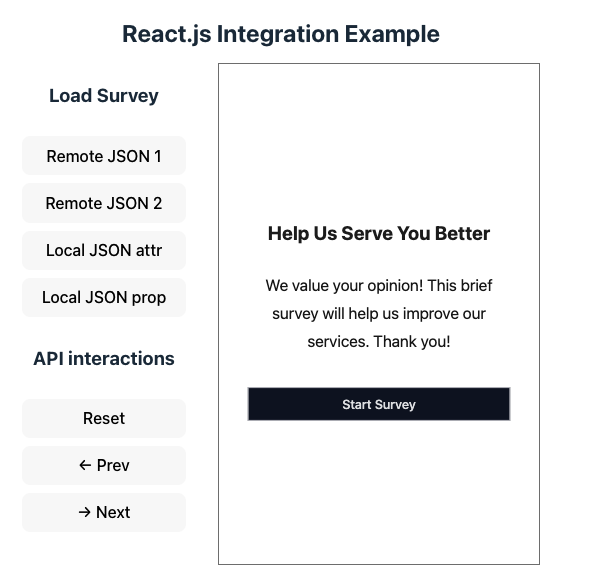
You can refer to the following example repository for a working example of CueCatch React.js integration. This example demonstrates how to load a survey from remote and local JSON files and interact with the survey component using the API. View source on GitHub